



No consigo volver a leer lo que me gusta
Sí se puede, pero es que no es lo mismo
1.7.2 General Terminology
- Handle - Is a unsigned integer number assigned to processes, windows, buttons, resources and etc. Actually, it is an opaque pointer to some system data structure (Kernel Object), similar to Unix's file descriptor pointer. The purpose of using handles or opaque pointer is to hide the implementation of those data structures allowing implementators to change their inner working without disrupting application developers. This approach gives a pseudo object-oriented interface to the Windows API. See also:
- Note: A handle can be an obfuscated pointer exposed as an integer, void pointer void* (also opaque pointer) or ordinary opaque pointer (pointer to a C-struct or class which implementation is not exposed).
- Types of Kernel Objects (Handle is a numeric value related to the pointer to kernel object C-struct). The name "object" comes from the idea that it is possible to access the kernel data structure pointer by the handle using the Win32 API functions. It works in a similar way to classical object oriented programming where the data structure and internal representation can only be accessed by the class methodos.
- Symbolic Link
- Process
- A running program, executable. A process has its own address space, data, stack and heap.
- Job
- Group of processes managed as group.
- File
- Open file or I/O device.
- Token
- Security token used by many Win32 functions.
- Event
- Synchronization object used for notification.
- Threads
- Smallest unit of execution within a process.
- Semaphore
- Mutex
- Timer
- Object which provides notification after a certain period is elapsed.
References:
- Opaque pointer - Wikipedia - Note: Opaque pointer is also called "handle classes", "pimpl idiom", "Compiler-firewall", "d-pointer" in C++.
- Handle (computing) - Wikipedia
- c++ - win32 application aren't so object oriented and why there are so many pointers? - Stack Overflow
- Object-oriented techniques in C Dmitry Frank
- Object-oriented design patterns in the kernel, part 1
1.7.3 Common Data Types
| Data Type | Definition | Description |
|---|---|---|
| BOOL | typedef int BOOL | Boolean variable true (non zero) or false (zero or 0) |
| BYTE | typedef unsigned char BYTE | A byte, 8 bits. |
| CCHAR | typedef char CHAR | An 8-bit Windows (ANSI) character. |
| DWORD | typedef unsigned long DWORD | A 32-bit unsigned integer. The range is 0 through 4294967295 decimal. |
| DWORDLONG | typedef unsigned __int64 DWORDLONG | 64 bits usigned int. |
| DWORD32 | typedef unsigned int DWORD32 | A 32-bit unsigned integer. |
| DWORD64 | typedef unsigned __int64 DWORD64 | A 64-bit unsigned integer. |
| FLOAT | typedef float FLOAT | A floating-point variable. |
| INT8 | typedef signed char INT8 | An 8-bit signed integer. |
| INT16 | typedef signed short INT16 | A 16-bit signed integer. |
| INT32 | typedef signed int INT32 | A 32-bit signed integer. The range is -2147483648 through 2147483647 decimal. |
| INT64 | typedef signed __int64 INT64 | A 64-bit signed integer. |
| LPBOOL | typedef BOOL far *LPBOOL; | A pointer to a BOOL. |
| LPBYTE | typedef BYTE far *LPBYTE | A pointer to a BYTE. |
| LPCSTR, PCSTR | typedef __nullterminated CONST CHAR *LPCSTR | pointer to a constant null-terminated string of 8-bit Windows (ANSI) characters. |
| LPCVOID | typedef CONST void *LPCVOID; | A pointer to a constant of any type. |
| LPCWSTR, PCWSTR | typedef CONST WCHAR *LPCWSTR; | A pointer to a constant null-terminated string of 16-bit Unicode characters. |
| LPDWORD | typedef DWORD *LPDWORD | A pointer to a DWORD. |
| LPSTR | typedef CHAR *LPSTR; | A pointer to a null-terminated string of 8-bit Windows (ANSI) characters. |
| LPTSTR | An LPWSTR if UNICODE is defined, an LPSTR otherwise. | |
| LPWSTR | typedef WCHAR *LPWSTR; | A pointer to a null-terminated string of 16-bit Unicode characters. |
| PCHAR | typedef CHAR *PCHAR; | A pointer to a CHAR. |
| CHAR | ANSI Char or char | |
| WCHAR | Wide character 16 bits UTF16 | |
| TCHAR | - | A WCHAR if UNICODE is defined, a CHAR otherwise. |
| UCHAR | typedef unsigned char UCHAR; | An unsigned CHAR. |
| WPARAM | typedef UINT_PTR WPARAM; | A message parameter. |
-------------------------
A ver la tabla, dword es unsigned int. O sea, nombre raor además, porque int sí existe. Y lo lógico sería uint , por ejemplo.
| DWORD | typedef unsigned long DWORD | A 32-bit unsigned integer. The range is 0 through 4294967295 decimal. |
Es que por ejemplo este, es como decirme
unsigned int.
en learncpp tenían mejores descripciones
You and I know that 2 - 3 is -1, but -1 can’t be represented as an unsigned integer, so we get overflow and the following result:
Pues eso
DWORD ES UNSIGNED INT
| DWORD | typedef unsigned long DWORD | A 32-bit unsigned integer. The range is 0 through 4294967295 decimal. |
| DWORDLONG | typedef unsigned __int64 DWORDLONG | 64 bits usigned int. |
| DWORD32 | typedef unsigned int DWORD32 | A 32-bit unsigned integer. |
| DWORD64 |
unsigned long
unsigned dword32, 34
Int todos
Hay un modo también de hacerlo en C++
FLOAT
Eso qué era a todo esto
4.8 — Floating point numbers
C++ floating point types
C++ has three fundamental floating point data types: a single-precision float, a double-precision double, and an extended-precision long double. As with integers, C++ does not define the actual size of these types.
| Category | C++ Type | Typical Size |
|---|---|---|
| floating point | float | 4 bytes |
| double | 8 bytes | |
| long double | 8, 12, or 16 bytes |
On modern architectures, floating-point types are conventionally implemented using one of the floating-point formats defined in the IEEE 754 standard (see https://en.wikipedia.org/wiki/IEEE_754). As a result, float is almost always 4 bytes, and double is almost always 8 bytes.
On the other hand, long double is a strange type. On different platforms, its size can vary between 8 and 16 bytes, and it may or may not use an IEEE 754 compliant format. We recommend avoiding long double.
Tip
This tutorial series assumes your compiler is using an IEEE 754 compatible format for float and double.
You can see if your floating point types are IEEE 754 compatible with the following code:
For advanced readers
float is almost always implemented using the 4-byte IEEE 754 single-precision format.double is almost always implemented using the 8-byte IEEE 754 double-precision format.
However, the format used to implement long double varies by platform. Common choices include:
- 8-byte IEEE 754 double-precision format (same as
double). - 80-bit (often padded to 12 or 16 bytes) x87 extended-precision format (compatible with IEEE 754).
- 16-byte IEEE 754 quadruple-precision format.
- 16-byte double-double format (not compatible with IEEE 754).
Floating point variables and literals

Here are some definitions of floating point variables:
When using floating point literals, always include at least one decimal place (even if the decimal is 0). This helps the compiler understand that the number is a floating point number and not an integer.
Note that by default, floating point literals default to type double. An f suffix is used to denote a literal of type float.
Best practice
Always make sure the type of your literals match the type of the variables they’re being assigned to or used to initialize. Otherwise an unnecessary conversion will result, possibly with a loss of precision.
Printing floating point numbers
Now consider this simple program:
The results of this seemingly simple program may surprise you:
5
6.7
9.87654e+06
In the first case, std::cout printed 5, even though we typed in 5.0. By default, std::cout will not print the fractional part of a number if the fractional part is 0.
In the second case, the number prints as we expect.
In the third case, it printed the number in scientific notation (if you need a refresher on scientific notation, see lesson 4.7 -- Introduction to scientific notation).
Floating point range
| Format | Range | Precision |
|---|---|---|
| IEEE 754 single-precision (4 bytes) | ±1.18 x 10-38 to ±3.4 x 1038 and 0.0 | 6-9 significant digits, typically 7 |
| IEEE 754 double-precision (8 bytes) | ±2.23 x 10-308 to ±1.80 x 10308 and 0.0 | 15-18 significant digits, typically 16 |
| x87 extended-precision (80 bits) | ±3.36 x 10-4932 to ±1.18 x 104932 and 0.0 | 18-21 significant digits |
| IEEE 754 quadruple-precision (16 bytes) | ±3.36 x 10-4932 to ±1.18 x 104932 and 0.0 | 33-36 significant digits |
For advanced readers
The 80-bit x87 extended-precision floating point type is a bit of a historical anomaly. On modern processors, objects of this type are typically padded to 12 or 16 bytes (which is a more natural size for processors to handle). This means those objects have 80-bits of floating point data, and the remaining memory is filler.
It may seem a little odd that the 80-bit floating point type has the same range as the 16-byte floating point type. This is because they have the same number of bits dedicated to the exponent -- however, the 16-byte number can store more significant digits.
Floating point precision
Consider the fraction 1/3. The decimal representation of this number is 0.33333333333333… with 3’s going out to infinity. If you were writing this number on a piece of paper, your arm would get tired at some point, and you’d eventually stop writing. And the number you were left with would be close to 0.3333333333…. (with 3’s going out to infinity) but not exactly.
On a computer, an infinite precision number would require infinite memory to store, and we typically only have 4 or 8 bytes per value. This limited memory means floating point numbers can only store a certain number of significant digits -- any additional significant digits are either lost or represented imprecisely. The number that is actually stored may be close to the desired number, but not exact. We’ll show an example of this in the next section.
The precision of a floating point type defines how many significant digits it can represent without information loss.
The number of digits of precision a floating point type has depends on both the size (floats have less precision than doubles) and the particular value being stored (some values can be represented more precisely than others).
For example, a float has 6 to 9 digits of precision. This means that a float can exactly represent any number with up to 6 significant digits. A number with 7 to 9 significant digits may or may not be represented exactly depending on the specific value. And a number with more than 9 digits of precision will definitely not be represented exactly.
Double values have between 15 and 18 digits of precision, with most double values having at least 16 significant digits. Long double has a minimum precision of 15, 18, or 33 significant digits depending on how many bytes it occupies.
Key insight
A floating point type can only precisely represent a certain number of significant digits. Using a value with more significant digits than the minimum may result in the value being stored inexactly.
Outputting floating point values
When outputting floating point numbers, std::cout has a default precision of 6 -- that is, it assumes all floating point variables are only significant to 6 digits (the minimum precision of a float), and hence it will truncate anything after that.
The following program shows std::cout truncating to 6 digits:
This program outputs:
9.87654
987.654
987654
9.87654e+006
9.87654e-005
Note that each of these only have 6 significant digits.
Also note that std::cout will switch to outputting numbers in scientific notation in some cases. Depending on the compiler, the exponent will typically be padded to a minimum number of digits. Fear not, 9.87654e+006 is the same as 9.87654e6, just with some padding 0’s. The minimum number of exponent digits displayed is compiler-specific (Visual Studio uses 3, some others use 2 as per the C99 standard).
We can override the default precision that std::cout shows by using an output manipulator function named std::setprecision(). Output manipulators alter how data is output, and are defined in the iomanip header.
Outputs:
3.3333332538604736
3.3333333333333335
Because we set the precision to 17 digits using std::setprecision(), each of the above numbers is printed with 17 digits. But, as you can see, the numbers certainly aren’t precise to 17 digits! And because floats are less precise than doubles, the float has more error.
Tip
Output manipulators (and input manipulators) are sticky -- meaning if you set them, they will remain set.
The one exception is std::setw. Some IO operations reset std::setw, so std::setw should be used every time it is needed.
Precision issues don’t just impact fractional numbers, they impact any number with too many significant digits. Let’s consider a big number:
Output:
123456792
123456792 is greater than 123456789. The value 123456789.0 has 10 significant digits, but float values typically have 7 digits of precision (and the result of 123456792 is precise only to 7 significant digits). We lost some precision! When precision is lost because a number can’t be stored precisely, this is called a rounding error.
Consequently, one has to be careful when using floating point numbers that require more precision than the variables can hold.
Best practice
Favor double over float unless space is at a premium, as the lack of precision in a float will often lead to inaccuracies.
Rounding errors make floating point comparisons tricky
Floating point numbers are tricky to work with due to non-obvious differences between binary (how data is stored) and decimal (how we think) numbers. Consider the fraction 1/10. In decimal, this is easily represented as 0.1, and we are used to thinking of 0.1 as an easily representable number with 1 significant digit. However, in binary, decimal value 0.1 is represented by the infinite sequence: 0.00011001100110011… Because of this, when we assign 0.1 to a floating point number, we’ll run into precision problems.
You can see the effects of this in the following program:
This outputs:
0.1
0.10000000000000001
On the top line, std::cout prints 0.1, as we expect.
On the bottom line, where we have std::cout show us 17 digits of precision, we see that d is actually not quite 0.1! This is because the double had to truncate the approximation due to its limited memory. The result is a number that is precise to 16 significant digits (which type double guarantees), but the number is not exactly 0.1. Rounding errors may make a number either slightly smaller or slightly larger, depending on where the truncation happens.
Rounding errors can have unexpected consequences:
1
0.99999999999999989
Although we might expect that d1 and d2 should be equal, we see that they are not. If we were to compare d1 and d2 in a program, the program would probably not perform as expected. Because floating point numbers tend to be inexact, comparing floating point numbers is generally problematic -- we discuss the subject more (and solutions) in lesson 6.7 -- Relational operators and floating point comparisons.
One last note on rounding errors: mathematical operations (such as addition and multiplication) tend to make rounding errors grow. So even though 0.1 has a rounding error in the 17th significant digit, when we add 0.1 ten times, the rounding error has crept into the 16th significant digit. Continued operations would cause this error to become increasingly significant.
Key insight
Rounding errors occur when a number can’t be stored precisely. This can happen even with simple numbers, like 0.1. Therefore, rounding errors can, and do, happen all the time. Rounding errors aren’t the exception -- they’re the norm. Never assume your floating point numbers are exact.
A corollary of this rule is: be wary of using floating point numbers for financial or currency data.
Related content
For more insight into how floating point numbers are stored in binary, check out the float.exposed tool.
To learn more about floating point numbers and rounding errors, floating-point-gui.de and fabiensanglard.net have approachable guides on the topic.
NaN and Inf
IEEE 754 compatible formats additionally support some special values:
- Inf, which represents infinity. Inf is signed, and can be positive (+Inf) or negative (-Inf).
- NaN, which stands for “Not a Number”. There are several different kinds of NaN (which we won’t discuss here).
- Signed zero, meaning there are separate representations for “positive zero” (+0.0) and “negative zero” (-0.0).
Formats that are not compatible with IEEE 754 may not support some (or any) of these values. In such cases, code that uses or generates these special values will produce implementation-defined behavior.
Here’s a program showing all three:
And the results using Clang:
inf
-inf
0
-0
nan
Note that the results of printing Inf and NaN are platform specific, so your results may vary (e.g. Visual Studio prints the last result as -nan(ind)).
Best practice
Avoid division by 0.0, even if your compiler supports it.
Conclusion
To summarize, the two things you should remember about floating point numbers:
- Floating point numbers are useful for storing very large or very small numbers, including those with fractional components.
- Floating point numbers often have small rounding errors, even when the number has fewer significant digits than the precision. Many times these go unnoticed because they are so small, and because the numbers are truncated for output. However, comparisons of floating point numbers may not give the expected results. Performing mathematical operations on these values will cause the rounding errors to grow larger.
---------------
O sea, era decimal, bueno
Lo leeré más a detalle
| LPBOOL | typedef BOOL far *LPBOOL; | A pointer to a BOOL. |
| LPBYTE | typedef BYTE far *LPBYTE | A pointer to a BYTE. |
| LPCSTR, PCSTR | typedef __nullterminated CONST CHAR *LPCSTR | pointer to a constant null-terminated string of 8-bit Windows (ANSI) characters. |
| LPCVOID | typedef CONST void *LPCVOID; | A pointer to a constant of any type. |
| LPCWSTR, PCWSTR | typedef CONST WCHAR *LPCWSTR; | A pointer to a constant null-terminated string of 16-bit Unicode characters. |
| LPDWORD | typedef DWORD *LPDWORD | A pointer to a DWORD. |
| LPSTR | typedef CHAR *LPSTR; | A pointer to a null-terminated string of 8-bit Windows (ANSI) characters. |
| LPTSTR | An LPWSTR if UNICODE is defined, an LPSTR otherwise. | |
| LPWSTR | typedef WCHAR *LPWSTR; | A pointer to a null-terminated string of 16-bit Unicode characters. |
| PCHAR | typedef CHAR *PCHAR; | A pointer to a CHAR. |
Para qué apuntarías a BOOL, tipo, cómo defines aquí
LPBOOL Clase por ejemplo
O sea, cómo estructuras aquí la información, es que lo que me falla
12.7 — Introduction to pointers
Pointers are one of C++’s historical boogeymen, and a place where many aspiring C++ learners have gotten stuck. However, as you’ll see shortly, pointers are nothing to be scared of.
In fact, pointers behave a lot like lvalue references. But before we explain that further, let’s do some setup.
Related content
If you’re rusty or not familiar with lvalue references, now would be a good time to review them. We cover lvalue references in lessons 12.3 -- Lvalue references, 12.4 -- Lvalue references to const, and 12.5 -- Pass by lvalue reference.
Consider a normal variable, like this one:
Simplifying a bit, when the code generated for this definition is executed, a piece of memory from RAM will be assigned to this object. For the sake of example, let’s say that the variable x is assigned memory address 140. Whenever we use variable x in an expression or statement, the program will go to memory address 140 to access the value stored there.
The nice thing about variables is that we don’t need to worry about what specific memory addresses are assigned, or how many bytes are required to store the object’s value. We just refer to the variable by its given identifier, and the compiler translates this name into the appropriately assigned memory address. The compiler takes care of all the addressing.
This is also true with references:
Because ref acts as an alias for x, whenever we use ref, the program will go to memory address 140 to access the value. Again the compiler takes care of the addressing, so that we don’t have to think about it.
The address-of operator (&)
Although the memory addresses used by variables aren’t exposed to us by default, we do have access to this information. The address-of operator (&) returns the memory address of its operand. This is pretty straightforward:
On the author’s machine, the above program printed:
5
0027FEA0
In the above example, we use the address-of operator (&) to retrieve the address assigned to variable x and print that address to the console. Memory addresses are typically printed as hexadecimal values (we covered hex in lesson 5.3 -- Numeral systems (decimal, binary, hexadecimal, and octal)), often without the 0x prefix.
For objects that use more than one byte of memory, address-of will return the memory address of the first byte used by the object.
Tip
The & symbol tends to cause confusion because it has different meanings depending on context:
- When following a type name, & denotes an lvalue reference:
int& ref. - When used in a unary context in an expression, & is the address-of operator:
std::cout << &x. - When used in a binary context in an expression, & is the Bitwise AND operator:
std::cout << x & y.
The dereference operator (*)
Getting the address of a variable isn’t very useful by itself.
The most useful thing we can do with an address is access the value stored at that address. The dereference operator (*) (also occasionally called the indirection operator) returns the value at a given memory address as an lvalue:
On the author’s machine, the above program printed:
5
0027FEA0
5
This program is pretty simple. First we declare a variable x and print its value. Then we print the address of variable x. Finally, we use the dereference operator to get the value at the memory address of variable x (which is just the value of x), which we print to the console.
Key insight
Given a memory address, we can use the dereference operator (*) to get the value at that address (as an lvalue).
The address-of operator (&) and dereference operator (*) work as opposites: address-of gets the address of an object, and dereference gets the object at an address.
Tip
Although the dereference operator looks just like the multiplication operator, you can distinguish them because the dereference operator is unary, whereas the multiplication operator is binary.
Getting the memory address of a variable and then immediately dereferencing that address to get a value isn’t that useful either (after all, we can just use the variable to access the value).
But now that we have the address-of operator (&) and dereference operator (*) added to our toolkits, we’re ready to talk about pointers.
Pointers
A pointer is an object that holds a memory address (typically of another variable) as its value. This allows us to store the address of some other object to use later.
As an aside…
In modern C++, the pointers we are talking about here are sometimes called “raw pointers” or “dumb pointers”, to help differentiate them from “smart pointers” that were introduced into the language more recently. We cover smart pointers in chapter 22.
A type that specifies a pointer (e.g. int*) is called a pointer type. Much like reference types are declared using an ampersand (&) character, pointer types are declared using an asterisk (*):
To create a pointer variable, we simply define a variable with a pointer type:
Note that this asterisk is part of the declaration syntax for pointers, not a use of the dereference operator.
Best practice
When declaring a pointer type, place the asterisk next to the type name.
Warning
Although you generally should not declare multiple variables on a single line, if you do, the asterisk has to be included with each variable.
Although this is sometimes used as an argument to not place the asterisk with the type name (instead placing it next to the variable name), it’s a better argument for avoiding defining multiple variables in the same statement.
Pointer initialization
Like normal variables, pointers are not initialized by default. A pointer that has not been initialized is sometimes called a wild pointer. Wild pointers contain a garbage address, and dereferencing a wild pointer will result in undefined behavior. Because of this, you should always initialize your pointers to a known value.
Best practice
Always initialize your pointers.
Since pointers hold addresses, when we initialize or assign a value to a pointer, that value has to be an address. Typically, pointers are used to hold the address of another variable (which we can get using the address-of operator (&)).
Once we have a pointer holding the address of another object, we can then use the dereference operator (*) to access the value at that address. For example:
This prints:
5
5
Conceptually, you can think of the above snippet like this: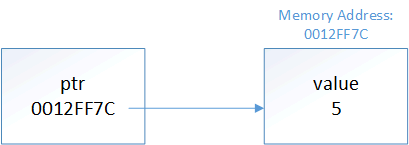
This is where pointers get their name from -- ptr is holding the address of x, so we say that ptr is “pointing to” x.
Author’s note
A note on pointer nomenclature: “X pointer” (where X is some type) is a commonly used shorthand for “pointer to an X”. So when we say, “an integer pointer”, we really mean “a pointer to an integer”. This understanding will be valuable when we talk about const pointers.
Much like the type of a reference has to match the type of object being referred to, the type of the pointer has to match the type of the object being pointed to:
With one exception that we’ll discuss next lesson, initializing a pointer with a literal value is disallowed:
Pointers and assignment
We can use assignment with pointers in two different ways:
- To change what the pointer is pointing at (by assigning the pointer a new address)
- To change the value being pointed at (by assigning the dereferenced pointer a new value)
First, let’s look at a case where a pointer is changed to point at a different object:
The above prints:
5
6
In the above example, we define pointer ptr, initialize it with the address of x, and dereference the pointer to print the value being pointed to (5). We then use the assignment operator to change the address that ptr is holding to the address of y. We then dereference the pointer again to print the value being pointed to (which is now 6).
Now let’s look at how we can also use a pointer to change the value being pointed at:
This program prints:
5
5
6
6
In this example, we define pointer ptr, initialize it with the address of x, and then print the value of both x and *ptr (5). Because *ptr returns an lvalue, we can use this on the left hand side of an assignment statement, which we do to change the value being pointed at by ptr to 6. We then print the value of both x and *ptr again to show that the value has been updated as expected.
Key insight
When we use a pointer without a dereference (ptr), we are accessing the address held by the pointer. Modifying this (ptr = &y) changes what the pointer is pointing at.
When we dereference a pointer (*ptr), we are accessing the object being pointed at. Modifying this (*ptr = 6;) changes the value of the object being pointed at.
Pointers behave much like lvalue references
Pointers and lvalue references behave similarly. Consider the following program:
This program prints:
555
666
777
In the above program, we create a normal variable x with value 5, and then create an lvalue reference and a pointer to x. Next, we use the lvalue reference to change the value from 5 to 6, and show that we can access that updated value via all three methods. Finally, we use the dereferenced pointer to change the value from 6 to 7, and again show that we can access the updated value via all three methods.
Thus, pointers and references both provide a way to indirectly access another object. The primary difference is that with pointers, we need to explicitly get the address to point at, and we have to explicitly dereference the pointer to get the value. With references, the address-of and dereference happens implicitly.
There are some other differences between pointers and references worth mentioning:
- References must be initialized, pointers are not required to be initialized (but should be).
- References are not objects, pointers are.
- References can not be reseated (changed to reference something else), pointers can change what they are pointing at.
- References must always be bound to an object, pointers can point to nothing (we’ll see an example of this in the next lesson).
- References are “safe” (outside of dangling references), pointers are inherently dangerous (we’ll also discuss this in the next lesson).
The address-of operator returns a pointer
It’s worth noting that the address-of operator (&) doesn’t return the address of its operand as a literal (as C++ doesn’t support address literals). Instead, it returns a pointer to the operand (whose value is the address of the operand). In other words, given variable int x, &x returns an int* holding the address of x.
We can see this in the following example:
On Visual Studio, this printed:
int
int *
With gcc, this printed i (int) and pi (pointer to int) instead. Because the result of typeid().name() is compiler-dependent, your compiler may print something different, but it will have the same meaning.
The size of pointers
The size of a pointer is dependent upon the architecture the executable is compiled for -- a 32-bit executable uses 32-bit memory addresses -- consequently, a pointer on a 32-bit machine is 32 bits (4 bytes). With a 64-bit executable, a pointer would be 64 bits (8 bytes). Note that this is true regardless of the size of the object being pointed to:
The size of the pointer is always the same. This is because a pointer is just a memory address, and the number of bits needed to access a memory address is constant.
Dangling pointers
Much like a dangling reference, a dangling pointer is a pointer that is holding the address of an object that is no longer valid (e.g. because it has been destroyed).
Dereferencing a dangling pointer (e.g. in order to print the value being pointed at) will lead to undefined behavior, as you are trying to access an object that is no longer valid.
Perhaps surprisingly, the standard says “Any other use of an invalid pointer value has implementation-defined behavior”. This means that you can assign an invalid pointer a new value, such as nullptr (because this doesn’t use the invalid pointer’s value). However, any other operations that use the invalid pointer’s value (such as copying or incrementing an invalid pointer) will yield implementation-defined behavior.
Key insight
Dereferencing an invalid pointer will lead to undefined behavior. Any other use of an invalid pointer value is implementation-defined.
Here’s an example of creating a dangling pointer:
The above program will probably print:
5
6
6
But it may not, as the object that ptr was pointing at went out of scope and was destroyed at the end of the inner block, leaving ptr dangling.
Conclusion
Pointers are variables that hold a memory address. They can be dereferenced using the dereference operator (*) to retrieve the value at the address they are holding. Dereferencing a wild or dangling (or null) pointer will result in undefined behavior and will probably crash your application.
Pointers are both more flexible than references and more dangerous. We’ll continue to explore this in the upcoming lessons.
-------------------
Muy entendible
Y está todo perfecfto por el lado de learncpp
Pero me falla Win32, porque Win32 se esfuerza muchísimo en ser una documentación ambigüa, qué te cuesta poner ejemplos ejemblos básicos de bool ejemplo, float ejemplo
Y ya luego nos metemos en las ventanas, o sea, la intrdoucción más básica, es dolorosa, pero está ahí
Comments
Displaying 0 of 0 comments ( View all | Add Comment )