


Hai hai everyone!!
I was looking for resources for blinkies, stamps and buttons and I wanted to share these websites that could help you guys for your profiles!!
The one that i used the most:
EYESTRAIN AND FLASHING LIGHTS WARNING!!! (can disable with button if u scroll a bit down):
Love this one, very pretty website and plenty of different stuff (if on computer it's better in fulllscreen)
that's all for now cuz i'm lazy to search for more.
i KNOW i had a good website for buttons but i can't find it ... mhhh
--UPDATE 22/06/2026:--
I finally found it, the greatest button collection  (half of the website is broken but there is still a LOT of buttons to take.)
another stamp collection, pretty small but very cute
Also take a closer look to some websites, there are links to more blinkies collections or more. anyways, i found a blinkie wiki!
Anyways, let me know if i should add a collection corner to my website!! :3
--UPDATE 16/08/2026:--
Took away a link cause they were promoting AI art and I didn't notice, what a shame. any ways here is my own collection and some more links!!
Some websites to make your own blinkes!
QUICK TUTORIAL:
1. DOWNLOAD all the blinkies/stamps/buttons ect that you want to put in ur profile or website! (Do not copy the link directly, it causes the owner of the website to pay more and makes the network more busy each time the page is reloaded, as the website has to search from the original website you took the stamp/blinkie from)
2. Use postimg or ImgBB (or any other similar site you might be familiar with) to import all of them
3. Copy the DIRECT LINK of those images (one at a time) (has to be direct link, either way it won't work.)
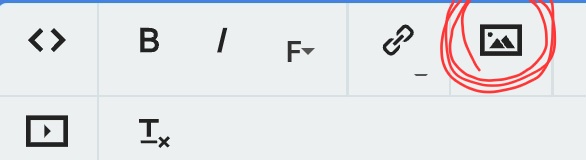
4. Click on that picture box and paste the link to insert the picture.
Have fun!
You can also use html with :
<img src="(your link)" alt="(image description)">You can specify the size or you pictures with the attribute width right after the alt=""!
Comments
Displaying 6 of 6 comments ( View all | Add Comment )
dorothyof_oz
Where do I add blinkies?
Okay, so you can basically add them anywhere in your profile! When you write something there's a little picture box above, like here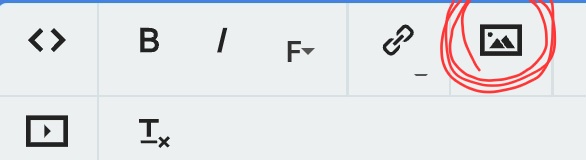
Once you clicked on it it will ask for a link. Either you copy the link of the picture/blinkie you want by right-clicking it (or maintain on phone) and then paste it there. You can also download the picture and use a site like postimg (I'm not familiar with others) to get the DIRECT LINK (only works with direct link). You can now do that with any pictures you want, not just blinkies.
Also I'm pretty sure that "copy image" and then pasting It where you want works as well, but now you have all different ways of doing it! Hope it helps :]
by xX-Kitty//Lovebug-Xx; ; Report
Omg thank you! Yes it does!!!!
by dorothyof_oz; ; Report
Sorry, let me correct myself, I just learned that you shouldn't copy the link of a blinkie but instead download it and then import it with posting (or others) since coping the link will cause in commiting some kind of theft that causes the owner of the website to pay more :( the best solution is to download everything you want
by xX-Kitty//Lovebug-Xx; ; Report
Ohhh! Tysm for telling me!
by dorothyof_oz; ; Report
mrsurrealist
very helpful !Σ(・□・ )