

i'll try my best to explain, feel free to ask for clarification/help with altering (^ ^)
i'll be categorising each section using "/**/" comments, you can copy and paste the code and figure things out yourself if preferred
text in pink are where you replace with your own chosen settings
text in purple are more optional advanced customisations
view individual code explanations at the end of each section
how it looks:
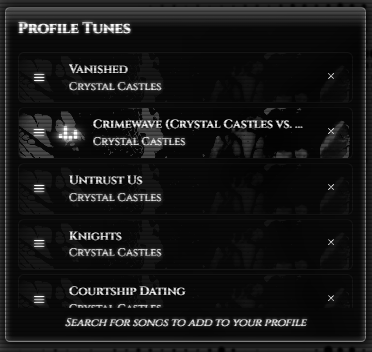
/*customise the widget container(profile tunes widget section)*/
.profile-playlist-widget {
background: linear-gradient(#535353 0%, #000000cc 6%) !important;
border: 1px solid #808080 !important;
box-shadow: inset 0px 0px 5px 1px #535353, #000 1px 1px 10px 2px !important;
border-radius: 5px 5px 5px 5px !important;
max-width: none !important;
width: 129% !important;
margin-left: 0% !important;
}
explanation
customise the widget container(profile tunes widget section explanation----
background-use this to change the background color of the widget
border- i used this to add a thin white border to the widget, remove to have no border
box-shadow- i used this to add a white glow and make it have a shadow, optional
border-radius- used this to made the corners rounded, if you want to make the widget have sharp corners, replace "5px" with "0px", optional
max width and width- i used this to make the widget wider to match my profile, use <100% to make thinner and >100% to make wider, remove to keep default width, optional NEED TO USE MAX-WIDTH AND WIDTH TOGETHER
margin left- use this to keep the widget at the left(?), line up with everything on the left(?), optional
profile tunes widget section end of explanation
-----------------------------
/*customise the text in the widget(profile tunes widget text)*/
.profile-playlist-widget * {
color: white !important;
text-shadow: 0 0 3px white;
}
explanationcustomise the text in the widget(profile tunes widget text)explanation----
color- use this to change the color of the text in widget, optional if you want to keep the default blue text color
text shadow- i used this to add the white glow on the text, optional
profile tunes widget text end of explanation
----------------------------
/*customise the color of the animated bar equaliser that plays beside the current song*/
li.profile-playlist-item.current .pp-equalizer {
display: flex !important;}
li.profile-playlist-item.current .pp-equalizer span {
background-color: white !important;
box-shadow: 0 0 3px white, 0 0 8px white, 0 0 12px white !important;
}
self-explanatory, box-shadow adds a glow around it, optional
----------------------------
/*hide the semi transparent blue overlay that appears when you hover over a song*/
li.profile-playlist-item.current {
position: relative;
overflow: hidden;
background: transparent !important;}
li.profile-playlist-item {
position: relative;
overflow: hidden;
background: transparent !important;}
self-explanatory, just copy and paste
----------------------------
/*change the color of the border that appears when you hover over a song*/
.profile-playlist-item:hover {
border-color: white !important;
transition: 0.5s ease !important;
box-shadow: 0 0 4px rgba(255, 255, 255, 0.5),
0 0 10px rgba(255, 255, 255, 0.25) !important;
}
explanationexplanation----
border color- use this to change to whatever color you want
transition- i added this so its a smooth animation when the border appears and disappears, optional
box shadow- i use this to make the border have a glow
----------------------------
the following codes are for adding an overlay image on the song bars, optional
the current song playing will have a higher transparency
/*overlay for the current song*/
li.profile-playlist-item.current::before {
content: "";
position: absolute;
inset: 0;
background-image: url("replace with https:// url of the image you want to use");
background-size: cover;
background-repeat: no-repeat;
opacity: 0.25;
pointer-events: none;
z-index: 0;}
change the opacity if the overlay is too dark or bright, with 1 being solid image and 0 being completely transparent
/*fix so overlay doesnt go over the text for the current song(just add this)*/
li.profile-playlist-item.current > * {
position: relative;
z-index: 1;}
/*overlay for the rest of the songs*/
li.profile-playlist-item::before {
content: "";
position: absolute;
inset: 0;
background-image: url("replace with https:// url of the image you want to use");
background-size: cover;
background-repeat: no-repeat;
opacity: 0.05;
pointer-events: none;
z-index: 0;}
change the opacity if the overlay is too dark or bright, with 1 being solid image and 0 being completely transparent
things to check if the code isn't working:
- make sure the code is inside <style></style> tags
- make sure the declaration blocks are opened ({) and closed (}) for each command
- make sure all declarations have a declaration terminator (;)
- make sure to use !important if you didnt add it from my base code
Comments
Displaying 0 of 0 comments ( View all | Add Comment )