
i am try to adapt my spacehey layout here.
i am beginning but i have a problem.
i can't remove a line in the part down of nav.
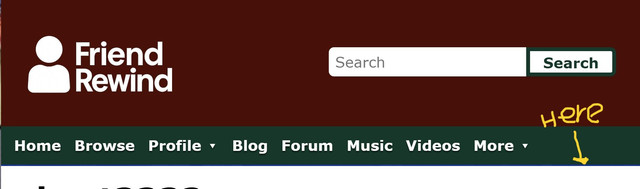
this the part of code that i have.
<style>
.myspace-header .top-nav { background:#4e0b05;
Border-bottom:none;}
.myspace-header .main-nav-container { background:#033828;
border:none;}
.myspace-header .search-input { background:white;
color:#033828;
border:none;}
.myspace-header .search-button { border: 3px solid #033828;
background:white;
color:#033828;}
.myspace-header .main-nav-wrapper { border:none;}
.myspace-header .main-nav li a { color:white;
border:none;}
.myspace-header .main-nav li a:hover { color:white;
background:#033828;}
</style>
<style>
.profile-page {
background-image: url("https://i.ibb.co/LzL5d7WR/daria-friendrewind.jpg" ) !important;
background-size: 600px !important;
background-repeat: repeat !important;
background-attachment: fixed !important;
background-position: center center !important;}
main {background:white;
border:none;}
</style>
i hope that you understand (english isn't my native language)