

Home» Forum» Web & Tech» how do i get rid of these weird black lines on my links bar?

how do i get rid of these weird black lines on my links bar?

Back to Web & Tech

so, there are these ugly little lines that appear after each link on my nav links.

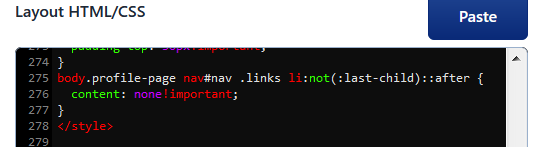
i did some inspect elementing and figured out it's this weird thing called ::after. i'm still confused on what the hell this is but eventually i found out if i just set the content to "none" it would go away, and it did. but only in the inspect element view.
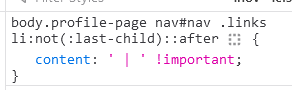
when i pasted the fixed code into my profile html, it did nothing. i'm not the brightest when it comes to html/css so i dunno what i did wrong. anyone know how to fix this?
have you tried using display:none instead? that works for my friends n i

are they left searching for me in eternity?

@siopao

unfortunately didn't work but i think i might've figured out the problem?? it keeps detecting part of the code as an emoji lmao

bump... still trying to figure this out T_T

could you try adding font-size:0!important to it? its so weird that its not going away for you..

Tryin to make a change :-\

@da didn't work unfortunately </3 thank you though

@zeffdakilla hmmm could you try adding this full line ,not adding it to the selector you have just add to the css  

.links *::after {display:none!important;}

Tryin to make a change :-\

@da OMG this one worked!! thank you so much 😭🙏

@zeffdakilla I'm so glad ヾ(≧▽≦*)o the selector you copied was so confusing and wasnt working for me either for somereason..! what i gave you there is that * points to everything inside .links and adding ::after means that its pointing to every single pseudoelement (the "content:" thingies) inside * and making sure none of those are visible

Tryin to make a change :-\

You must be logged in to reply.