
Home» Forum» Web & Tech» (Help) How to get rid of this blue line in my navigation section?

(Help) How to get rid of this blue line in my navigation section?

Back to Web & Tech

Hello. There's a blue bar/line in my navigation section, and I can't seem to find where it comes from through inspect element. I'm a beginner to HTML/CSS so don't yet know many things. I am also having issues with the FriendRewind code overriding mine in general, but I was able to override those overrides; this one I can't even find.
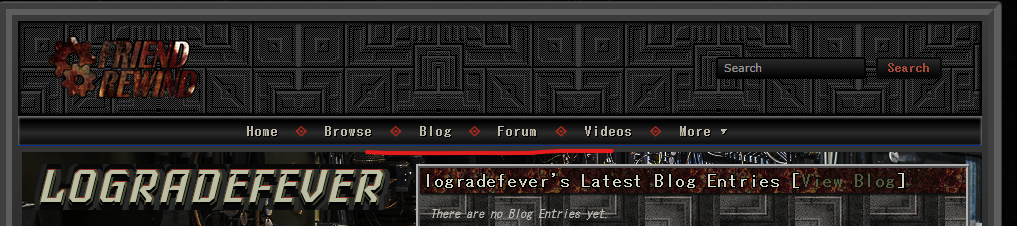

I'm pretty sure I've seen posts about this same problem, but I can't seem to find them, so I apologize. Either way, thank you for reading.

Update: I found the aforementioned post again yesterday and promptly fixed the issue. Since I already made this post, I will leave the solution provided by Def3ct here for any who may be facing the same issue.


Add this to your CSS and it will do away with the blue line.


.myspace-header .top-nav {

  border-bottom: none !important;

}

.myspace-header .main-nav-wrapper {

  background: #033828 !important;

  border-top: none !important;

  border-bottom: none !important;

  top: 0 !important;

}

.myspace-header .main-nav-container {

  border: none !important;

}

.myspace-header .main-nav li a {

  border-right: none !important;

}


You must be logged in to reply.