
how do i customise my blog? do i just write the code in where you write the blog? or is there another way to do it. also would it be different than coding my profile? also tips for coding it would be appreciated. i'm not the best at coding as of now!!


I'm not a proffesional with HTML/CSS but I can help you as best as I can. But yeah it is true that different from coding a profile because most of the parts are specific.
In the screenshot you can see I have circled a specific button, there are two choices you wanna make.
Option 1: If you can't code it to yourself. Press the 'Browse Layouts' then pick a layout what you desired...Copy the code, press the "<>" icon and place the code UNDERNEATH your texts from your blog. Otherwise everythibg gets messy.
Option 2: If you wanna code on your own, copy the empty code underneath the screenshot, ofcourse press the "<>", always remember the code under the text and then customize what you desired and what you like. Be patient and try to understand how everything work from the code. Hope this helps :P
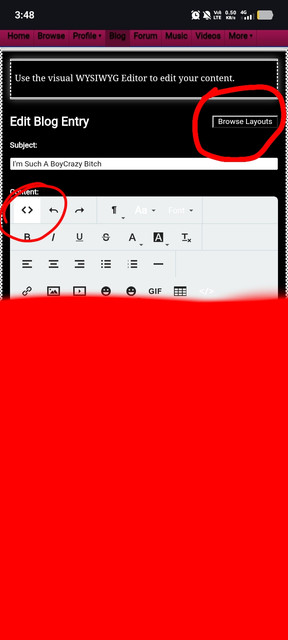
CODE:
<style>
@import url('https://fonts.googleapis.com/css2?family=VT323&display=swap');
p{ font-family:'Playfair Display', serif;
font-size: 115%;
color: PICK A COLOR;
}
body{
background-color: PICK A COLOR;
}
body {
background: url(PUT AN IMAGE LINK);
}
main {
background-color: PICK A COLOR;
color: PICK A COLOR;
}
.inner b {
color: PICK A COLOR;
}
nav .top {
background-color: PICK A COLOR;
}
nav .links {
background-color: PICK A COLOR;
text-align: right;
background-position: center;
background-repeat: no-repeat;
}
button {
color: PICK A COLOR;
background-color: PICK A COLOR;
}
.count {
color: PICK A COLOR;
}
a {
color: PICK A COLOR;
}
nav .links a {
color: PICK A COLOR;
}
div.top, footer {
background: url(PICK A LINK IMAGE);
color: PICK A COLOR;
}
footer p {
color: PICK A COLOR;
}
footer .links {
color:PICK A COLOR;
}
.comments-table td:first-child, .comments-table td, .comment-replies, .details-table td:first-child, .details-table td {
background: PICK A COLOR;
color: PICK A COLOR;
}
.edit-info {
background-color: PICK A COLOR;
border: 1px;
}
.blog-entry .title {
background-color: PICK A COLOR;
color: PICK A COLOR;
border: 1px;
}
p.links a:first-child .icon{
content: url("PUT A LINK IMAGE HERE”);
}
p.links a:nth-child(2) .icon {
content: url(“PUT A LINK IMAGE HERE");
}
p.links a:last-child .icon, table.comments-table td .icon {
content: url(“PUT AN IMAGE LINK HERE”);
}
.blog-entry, .content {
background-color: PICK A COLOR;
}
main .left {
background-color: black;
color: PICK A COLOR;
}
main .right {
background-color: PICK A COLOR;
}</style>
@Ghoulz_Rock! omg thxxx so much this is rlly helpful!!
You must be logged in to reply.